
The Dashboard is a swimmer’s home view: top swim, a performance snapshot, and best times at a glance. Open the app and read it top to bottom. It is free.
What Dashboard shows you
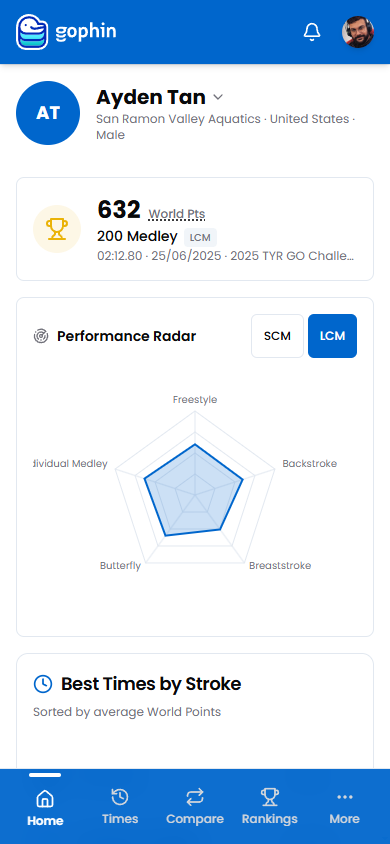
The Dashboard greets you with the swimmer you are following: their club and country, their highest scoring swim, a snapshot across strokes, and their best times sorted by World Points.
It is the fastest read on where a swimmer stands today.
Step by step
Open the Dashboard
Tap the Home tab. It opens on the swimmer you are following.
Check the swimmer header
See the club and country. Tap the name to switch to another swimmer.
Read the top swim
The headline card is the highest scoring result by World Points.
Scan the snapshot
The radar gives a quick read across all five strokes.
Review best times by stroke
Sorted by World Points, so the strongest events sit at the top.
What's included
What's included
The Dashboard is free. The cross stroke snapshot is a preview of Performance Radar, for deeper, multi swimmer analysis.
Tips
- Switch swimmers from the header. One tap changes the whole view.
- The top card is the best swim by points, not the most recent.
- Use it as a daily check. It is the fastest read on a swimmer.
- Dive deeper from any section into Best Times, Meets, or Rankings.
Common questions
What does the Gophin Dashboard show?
The Dashboard is a swimmer's home view. It shows the swimmer's club and country, their highest scoring swim by World Points, a snapshot across all five strokes, and their best times sorted by points. It is the fastest read on where a swimmer stands today.
Why is the top card not my most recent swim?
The headline card is the highest scoring result by World Points, not the most recent race. It surfaces a swimmer's strongest swim so the best events sit at the top.
Is the Dashboard free?
The Dashboard is free. The cross stroke snapshot is a preview of Performance Radar, for deeper, multi swimmer analysis.