
Favorites is your shortlist of swimmers to follow. Add anyone, and their performances are a tap away. Open Favorites, add a swimmer, and manage the list. It is free.
What Favorites shows you
Favorites lets you follow any swimmer, your own athlete and the names you want to measure against. The list is yours to shape.
It also feeds the comparison tools, so when you want to see how everyone stacks up, your favorites are already there.
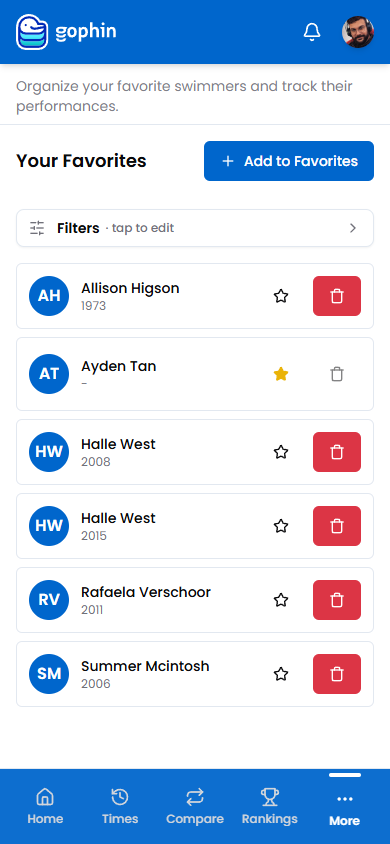
Step by step
Open Favorites
Go to Management, then Favorites, or use the Favorites view.
Add a swimmer
Tap Add to Favorites and search by name.
Mark your swimmer
Use the star to keep a swimmer on the list. The star also marks your own swimmer.
Tidy the list
Open Filters to narrow a long list, and use the delete button to remove anyone.
What's included
What's included
Favorites is free. To compare your favorites head to head or rank them per event, use Compare Swimmers and Group Comparison.
Tips
- Add the names you measure against, not just your own swimmer.
- Keep the list focused on who you actually track.
- Your starred swimmer leads the comparisons.
- Favorites feed Group Comparison, which ranks them all per event.
Common questions
How do I follow a swimmer in Gophin?
Open Favorites under Management, tap Add to Favorites, and search by name. You can follow any swimmer, your own athlete and the names you want to measure against.
Is there a limit to how many swimmers I can favorite?
No. Favorites is free, and you can follow any swimmer you want to track. Use the star to mark your own swimmer and Filters to narrow a long list.
What do favorites do besides save a swimmer?
Favorites feed the comparison tools, so your saved swimmers are ready to use. You can compare them head to head or rank them per event with Group Comparison.