
Compare Swimmers puts two swimmers side by side, event by event, so you see exactly where the gap is. Pick two swimmers, set the events, and read the head to head.
What Compare Swimmers shows you
Compare Swimmers lines up two swimmers across every event they share. For each one you see both times, the difference, and a chart of how they stack up.
It is the fastest way to turn "who is faster" into a precise, event by event answer.
Step by step
Open Comparisons
In the menu, go to Compare, then Swimmers.
Choose the two swimmers
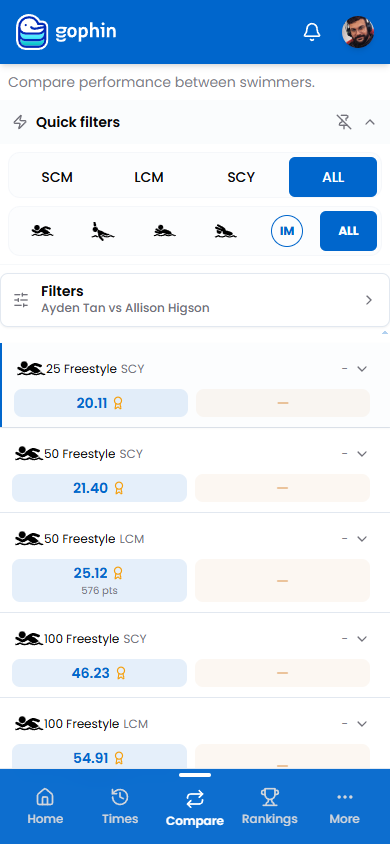
Open Filters to set swimmer A and the swimmer to compare with. Picking from your Favorites is quickest.
Set the event view
Use the quick filters for course and stroke to focus the comparison.
Read the head to head
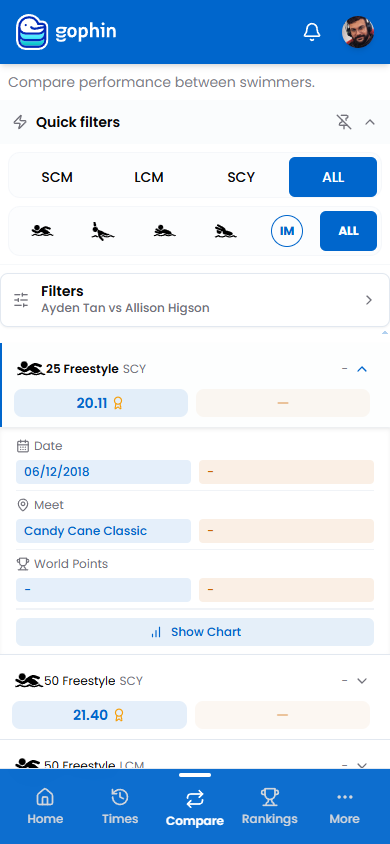
Each row shows swimmer A’s time on the left and the other on the right, with the medal marking the faster swim.
Open the detail
Tap a row to expand the date, meet, and World Points, then choose Show Chart.
What's included
What's included
Compare Swimmers is included for everyone, alongside full rankings, season over season analysis, Performance Radar, and all 38+ qualifying standards.
Tips
- Pick swimmers from Favorites first. They are ready to compare.
- Use the same course for a fair read.
- An empty side means no time for that event.
- Use the gap, not the place. The seconds tell the real story.
Common questions
How do I compare two swimmers in Gophin?
Go to Compare, then Swimmers. Open Filters to set the two swimmers, then use the course and stroke filters to focus. Each row shows both times, the difference, and a chart of how they stack up.
Is Compare Swimmers free?
Yes. Compare Swimmers is included for everyone, alongside full rankings, season over season analysis, Performance Radar, and all 38+ qualifying standards.
Why is one swimmer's side empty for an event?
An empty side means that swimmer has no recorded time for that event. The comparison only shows events both swimmers have swum, with a medal marking the faster swim.