
The World Points Calculator turns any time into a World Aquatics score, so you can compare swims across different events. Enter a time, set the event, and read the points. It is free.
What World Points Calculator shows you
World Points put every swim on one scale. A score of 1000 matches the world record for that event, so a 100 freestyle and a 200 backstroke become directly comparable.
The calculator works for any time you type in, and every time in the app already shows its points.
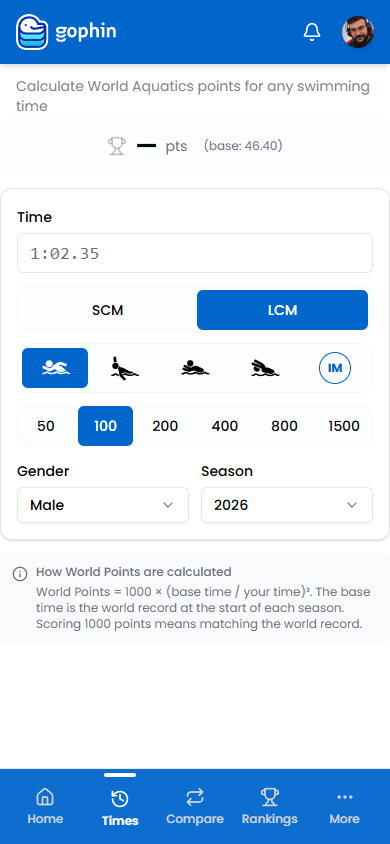
Step by step
Open the calculator
In the menu, go to Tools, then World Points.
Enter a time
Type the time you want to score.
Set the event
Choose the course (SCM or LCM), stroke, and distance.
Set gender and season
The season sets the base time, which is the world record at the start of that season.
Read the points
The score appears at the top. The formula is 1000 times the base time divided by your time, cubed.
What's included
What's included
The World Points Calculator is free, and every time across the app already shows its World Points for quick comparison.
Tips
- Use points to compare across events. That is what they are for.
- The season sets the base. Pick the one that matches the swim.
- 1000 points means matching the world record.
- No need to retype. Every time in the app already shows its points.
Common questions
What are World Aquatics points and how are they calculated?
World Points put every swim on one scale so a 100 freestyle and a 200 backstroke become directly comparable. The formula is 1000 times the base time divided by your time, cubed. A score of 1000 matches the world record for that event.
Is the World Points Calculator free in Gophin?
Yes, it is free. On top of that, every time across the app already shows its World Points automatically, so for most swims there is nothing to enter by hand.
What do I need to enter to score a time?
Type the time, then set the course (SCM or LCM), stroke, distance, gender, and season. The season sets the base time, which is the world record at the start of that season, so pick the one that matches the swim.