
Meets shows every result a swimmer has swum, meet by meet, with placements and points. Open Meets, filter to a meet or stroke, and read each swim. It is free.
What Meets shows you
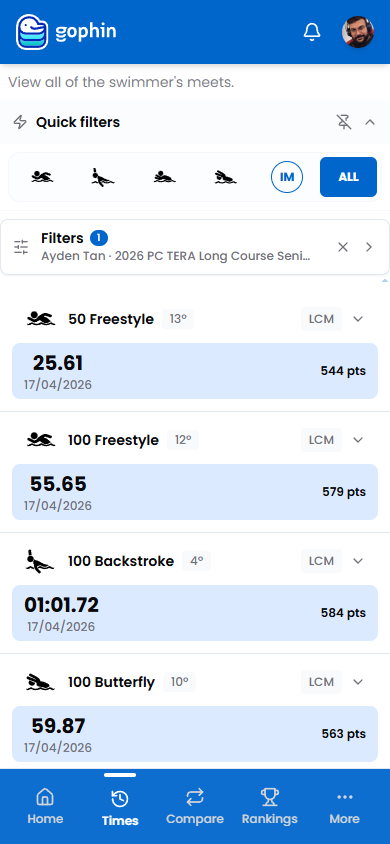
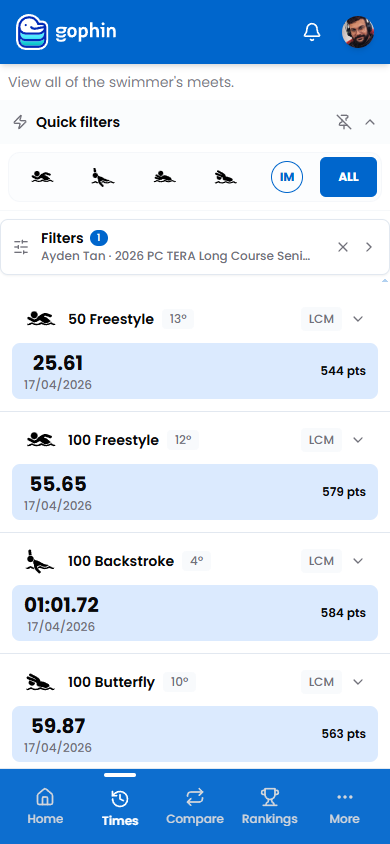
Meets is the full competition history. It lists every official result, with the time, the placement, the date, and the World Points for each swim.
Results sync automatically from official competition records, so there is nothing to enter by hand.
Step by step
Open Meets
In the menu, go to Times, then Meets.
Filter the history
Use the stroke quick filter, or open Filters to pick a specific meet and season.
Read each result
Every row shows the event, the placement, the course, the time, the date, and the points.
Open a result
Tap a row to expand its detail.
What's included
What's included
Meets is free, forever. To compare results across seasons or against another swimmer, use Compare Seasons and Compare Swimmers.
Tips
- Filter to one meet. It is the fastest way to review a single competition.
- Watch the place badge. It shows the finish in each event.
- Use points across events. They make different races comparable.
- Pair with Best Times. See which results became personal bests.
Common questions
How do I see a swimmer's meet results in Gophin?
Go to Times, then Meets. It lists every official result, with the time, placement, date, and World Points for each swim. Filter by stroke or pick a specific meet and season.
Do meet results update automatically?
Yes. Results sync automatically from official competition records, so there is nothing to enter by hand. New meets appear as they are published.
Is meet history free in Gophin?
Yes, the full competition history is free, forever. To compare results across seasons or against another swimmer, use Compare Seasons and Compare Swimmers.